Storage & Labels: Find the Right Piece When It Sells
November 7, 2026
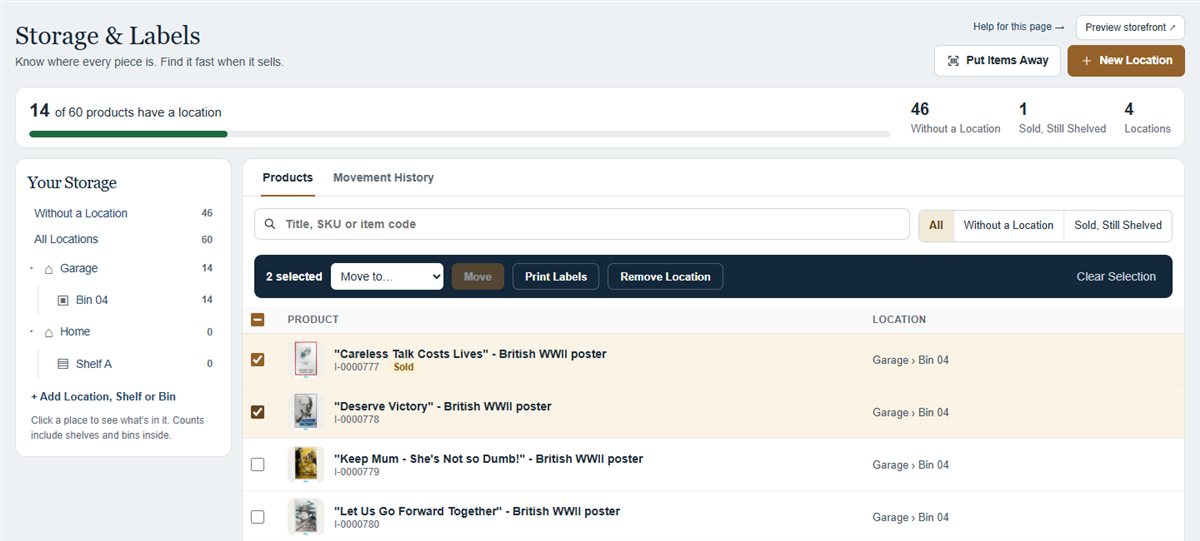
Know where every piece is. Organize your listings into private places, shelves and bins, print QR labels and find the right item quickly when it sells.
You remember the piece. Now remember where you put it.
Antiques and collectibles can wait years for their next owner. Storage & Labels helps you keep track of where your stock lives, using the listings and drafts you already manage in your World Class Antiques shop.
A Place for Every Piece
Start with Home, Garage, Storage Unit or Booth, or name your own location. Add shelves and bins to match the way you store your stock. Each product shows a clear path, such as Home › Office Shelves › Bin 1.
Put Stock Away Without Hunting Through the List
Select products and move them together, or open Put Items Away, choose a destination and enter each item code. A scanner that types the code and presses Enter can do the same job. Search by title, SKU or item code whenever you need to find a piece.
Print Labels for Products and Locations
Tick one or more products to reveal Print Labels in the selection bar. Select a location, shelf or bin and choose Print Label to label that space. The print view lets you choose a printer or save as PDF. Labels include a readable reference and a QR link back to the private storage record.
Move a Bin Once
Move a bin and the products inside follow it. Movement History records the previous and new locations, the person responsible and the time. The Sold, Still Shelved view helps you find sold pieces that still need pulling from storage. Selling a product does not erase its location.
Your Storage Stays Private
Storage locations and notes are available only to authorized store staff. Buyers do not see them. Order details show picking locations to your staff when it is time to prepare an order, and the feature reuses existing product photos.
Open Storage & Labels
Read the Storage & Labels guide
← All updates